
How to get the recipe from a cooking video
The food looks amazing, the video is 30 seconds long, and there is no recipe in sight. It's usually hiding somewhere. Here is where to look.
An example of how Sift answers (made up for this guide)
What’s the recipe? A pasta video with no recipe in the caption.
Creamy garlic pasta. The full recipe is in a reply.
From the comments: @pastaclips lists 200 g spaghetti, 4 cloves of garlic, 1 cup of cream and parmesan. Five replies say it worked.
The fast way: ask Sift
Sift is an iPhone app that reads the comments for you. Free to try, no sign-up.
Tap Share on the TikTok or Instagram
Use the normal Share button, the same one you use to send a post to a friend.
Pick Sift
The first time, swipe the row of apps to the end, tap More, and turn Sift on. After that it sits in your share row.
Tap “What’s the recipe?”
Sift offers the questions that fit the post. Tap one, or type your own.
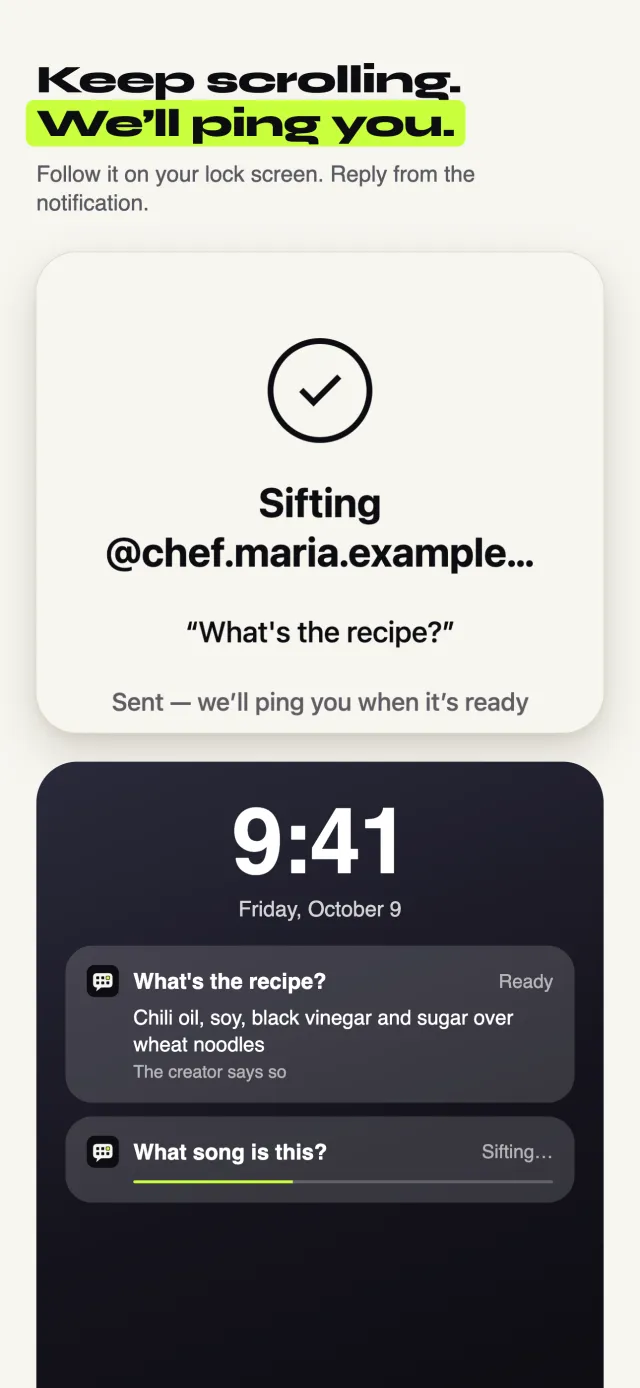
Keep scrolling
Sift reads the caption, what the creator says in the video, and the comments. You get one notification with the ingredients and steps it found, and where they came from.
The free way, no app needed
It takes longer, but it works. Try these in order.
Open the full caption
Tap “more” under the video. Many creators put the whole recipe there, below the hashtags.
Check the pinned comment
The creator often pins the recipe, or a link to it, as the top comment.
Tap the link in their bio
Open the creator's profile. A link in the bio often goes to a blog or a page with all their recipes.
Listen and pause
Turn the sound on and pause on the ingredients. Many creators say the amounts out loud or show them on screen.
Search the dish
Search the creator's name plus the dish, like “@creator chili oil noodles recipe”. Or search the dish alone for a close match.
Good to know
- Screenshot the ingredient list so you have it while you cook.
- If commenters say they made it, read their replies for fixes like “use half the salt”.
When Sift can’t help: Sift only passes on what the post and its comments say. If the creator never shared the amounts, Sift can't fill them in, and it won't make them up.
Updated October 10, 2026