
How to find part 2 of a TikTok series
The story ends on “Part 1” and you need to know what happened. Part 2 might be posted already, or it might not be out yet. Here is how to find it.
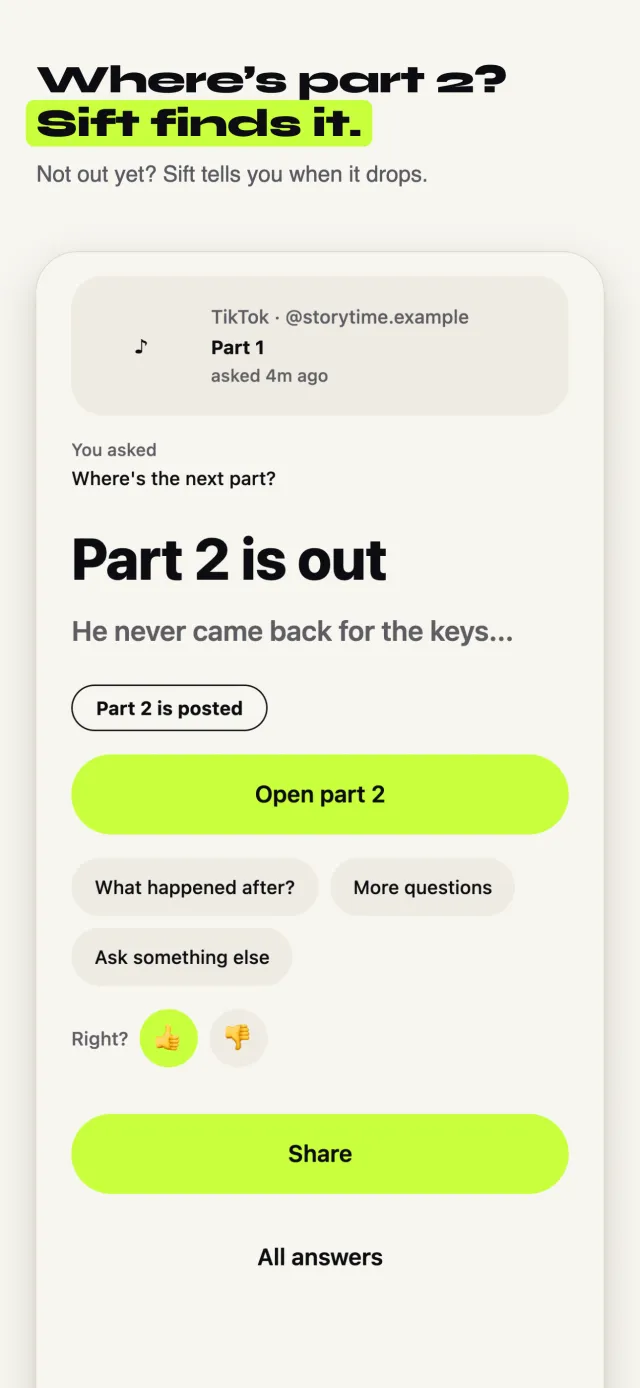
A real Sift answer
Where’s the next part? A TikTok story that ends on “Part 1”.
Part 2 is out
Sift checked the creator's posts and found it, posted Sep 28.
The fast way: ask Sift
Sift is an iPhone app that reads the comments for you. Free to try, no sign-up.
Tap Share on the TikTok
Use the normal Share button, the same one you use to send a post to a friend.
Pick Sift
The first time, swipe the row of apps to the end, tap More, and turn Sift on. After that it sits in your share row.
Tap “Where’s the next part?”
Sift offers the questions that fit the post. Tap one, or type your own.
Keep scrolling
Sift checks the creator's nearby posts and the comments. If part 2 is out, one tap opens that exact post. If it isn't out yet, Sift says so and can tell you when it drops (one alert is free).
The free way, no app needed
It takes longer, but it works. Try these in order.
Check for a playlist
Tap the creator's name. Many creators group a story into a playlist at the top of their profile. Part 2 is usually right there.
Look at their newest posts
Part 2 is often posted the same day or the next day. Scroll the creator's grid and look for “Part 2” in the cover text.
Search the comments
Comments like “part 2 is up” sometimes link it. The creator may also pin a reply with the link.
Search TikTok
Search the creator's username plus “part 2”. Search a key phrase from the story too, because re-uploads often use the same words.
Turn on notifications
If it isn't out yet, follow the creator and tap the bell on their profile to hear when they post.
Good to know
- Some creators post part 2 on another app first. Check their bio links.
- Pinned posts at the top of a profile are not always the newest ones. Scroll past them.
When Sift can’t help: If the creator hasn't posted the next part, nobody can find it yet, Sift included. Sift tells you that instead of guessing.
Updated October 10, 2026